
Maonocaster Lite AM200 Series FAQs and User Guide
Apr 13, 2022
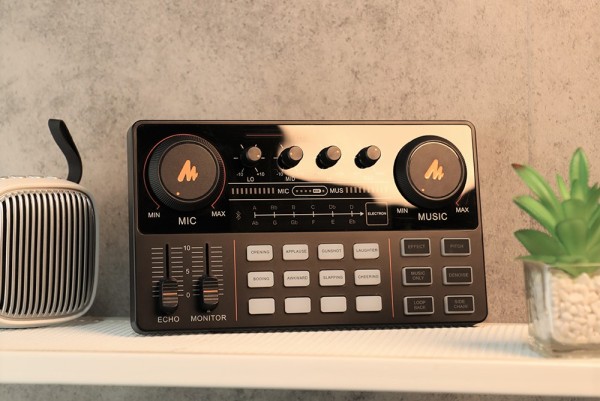
Since its release, the Maonocaster Lite AM200 series has been got the favor of many users from all over the world and has become a Best Seller in the Unpowered Recording Mixers category on Amazon.
Maono has organized a survey on Maonocaster Lite AM200 series user feedback to make better improvements to the products in the future. From this survey, Maono collected information about users’ experiences with the product and some of the problems they encountered.
Maono will help the users solve the problems they encountered and help them use the Maonocaster Lite correctly. (Note: This article mainly focuses on the user guide of Maonocaster Lite AM200 on PC. In addition to PCs, Maonocaster Lite AM200 can also be connected to smartphones, tablets, and other devices.)
1. Host devices do not recognize the device (the audio interface or the mic).
Through the survey, it is found that some users said that their host devices (PCs) can not recognize the audio interface or the microphone. If you also encounter similar problems, you can try the following methods.
A. Disconnect the Device and the PC or Unplug the PC’s Power Cable
Unplug the device from the PC first, then plug the device back into the PC to check if it works. If the device does not work, please unplug the PC’s power cable (please turn off the PC before unplugging the power cable). Wait 15 minutes, and then restart the PC. Next, try to plug the device into the PC again to see if it works.
B. Change the Property of USB Root Hub
First, open “Device Manager” – expand “Universal Serial Bus Controllers” – right click “USB Root Hub” – “Properties”. Next, click the “Power Management” tab – uncheck the“Allow the computer to turn off this device to save power”box.
C. Uninstall Hidden Devices
Enter the program command to show hidden devices, then uninstall them and reinsert the device.
D. Connect to Another PC
Plug the device into another PC. If the microphone works on the other PC, it means that the device is fine. Connecting the device to the original PC again may solve the problem.
E. Change Another USB Cable
For the specific steps of the above five methods, please click here.
2. How to set up AM200 after connecting to the PC?
STEP 1: Go to “Windows setting”.
STEP 2: Select “System”.
STEP 3: Select “Sound” and go to “Sound Control Panel”.
STEP 4: Set AM200 as default recording device in “Recording” of sound setting.
STEP 5: Double click “Maono AM200” go to “Properties”, select “Levels” and set it to 100.
STEP 6: Set the AM200 as default playback device in “Playback” of sound setting.
3. After AM200 is set up on the PC, how to set it in common software? (Take OBS and DISCORD as examples.)
OBS:
STEP 1: Select“Settings” in“File”.
STEP 2: Select“Audio”.
STEP 3: Select the device to be used in“Desktop Audio”.
DISCORD:
STEP 1: Open the“Setting”.
STEP 2: Select“Voice & Video”.
STEP 3: Select“MAONO AU-AM200” in “INPUT DEVICE & OUTPUT DEVICE”.
STEP 4: Test whether the sound input and output are normal, if there is no sound, please reconnect to the audio interface.
STEP 5: Turn off Automatic Gain Control.
For details on the above steps and the setup of other common software, please click here.
4. Noise problem of AM200-S1’s microphone
Speak closely and directly to the microphone to reduce ambient noise. Try to keep your mouth around 4-10 inches (10-25 cm) from the microphone.
The AM200-S1 is Maono’s entry-level product for newcomers to live streaming and podcasting and will only meet the basic needs of users. If you are looking for a higher performance microphone, there are other models in the Maonocaster Lite range for you to choose from, the AM200-S4 (desktop stand mic version) or the AM200-S6 (arm stand mic version).
Maono always pursues to better meet the real needs of users. We hope the above faqs and usage guide can help you.
Great news! Maonocaster E2 is coming. It is an upgraded version of Maonocaster Lite. With up to 60dB of gain range and phantom power, it supports premium dynamic and condenser microphones. What’s more, it can connect instruments like guitars and electronic drums via a 6.35mm input port, and it has 11 custom buttons for personalized effects settings.
Maono will continue to innovate and introduce more high-quality audio products in the future.
If you have any questions about the above FAQs and user guide, please leave a comment on the detailed guide page.
Media Contact
Company Name: MAONO Technology Co., Ltd.
Contact Person: Mona
Email: Send Email
City: Katy
State: Texas
Country: United States
Website: https://www.maono.com/
The post Maonocaster Lite AM200 Series FAQs and User Guide appeared first on Ed Cal Media Agency.
More News

Five-in-a-row Town sink league leaders
Whitstable came from behind to beat Isthmian South East leaders South Park and secure a fifth straight league victory.

Matchday Live: Accrington v Gillingham, Dover v Dorking, Maidstone v Maidenhead
Follow today’s football action, including Gillingham away to Accrington, in our live blog.

‘We’re going for afternoon point-grabbing’ – Ainsworth’s Accrington mission
Gareth Ainsworth knows Accrington inside out and has warned the Gills they must match the hosts’ intensity if they are to make it back-to-back wins.

Why Gillingham’s fringe players face an uphill battle to break through
Gillingham’s fringe players put in an impressive showing in midweek but manager Gareth Ainsworth is unlikely to tinker much with a winning formula.

Crawley extends Kent deal
Opening batsman Zak Crawley has extended his Kent Cricket contract for the second time this year.

Moses Itauma comeback plans revealed after devastating first career defeat
Chatham heavyweight Moses Itauma has a date set for his return to the ring.

‘I’ve got the best squad in the league’ - Ainsworth’s big Gillingham claim
Gillingham manager Gareth Ainsworth believes his squad is the best in League Two.

Football fixtures and results
Catch up with all the week’s football fixtures and results here.

Gills youngster sends another reminder of his potential
Gillingham youngster Louie Dayal is continuing to make the most of his EFL Trophy opportunities.

Gillingham boss puts late Brighton fightback into perspective
Gillingham manager Gareth Ainsworth admitted there were lessons learned for both teams in Tuesday night’s seven-goal EFL Trophy match.

Report: Gillingham put four past Brighton youth
Gillingham boosted their chances of reaching the Jersey Mike’s Trophy knockout stage with victory over Brighton under-21s on Tuesday night.

From fuming to fabulous: How Gillingham turned it around at Rotherham
Gillingham manager Gareth Ainsworth praised his coaching staff for playing their part in turning the game around at Rotherham on Saturday.
YOUR NEWS, OUR NETWORK.
Do you have Great News you want to tell the world?
Be it updates about your business or your community, you can make sure that it’s heard by submitting your story to our network reaching hundreds of news sites across 6 verticals.